Refugees Code
Build your own Pokedex
In this midcourse project, you'll need to build a pokedex like the one we show in the image below. For that, you´ll need to create from scratch the HTML that will shape each one of the Pokemon cards, style them accordingly and create the necessary scripts to iterate over your stored pokemons and display them on screen. With this project, you're going to have the chance to put into practice all that you've learnt so far.
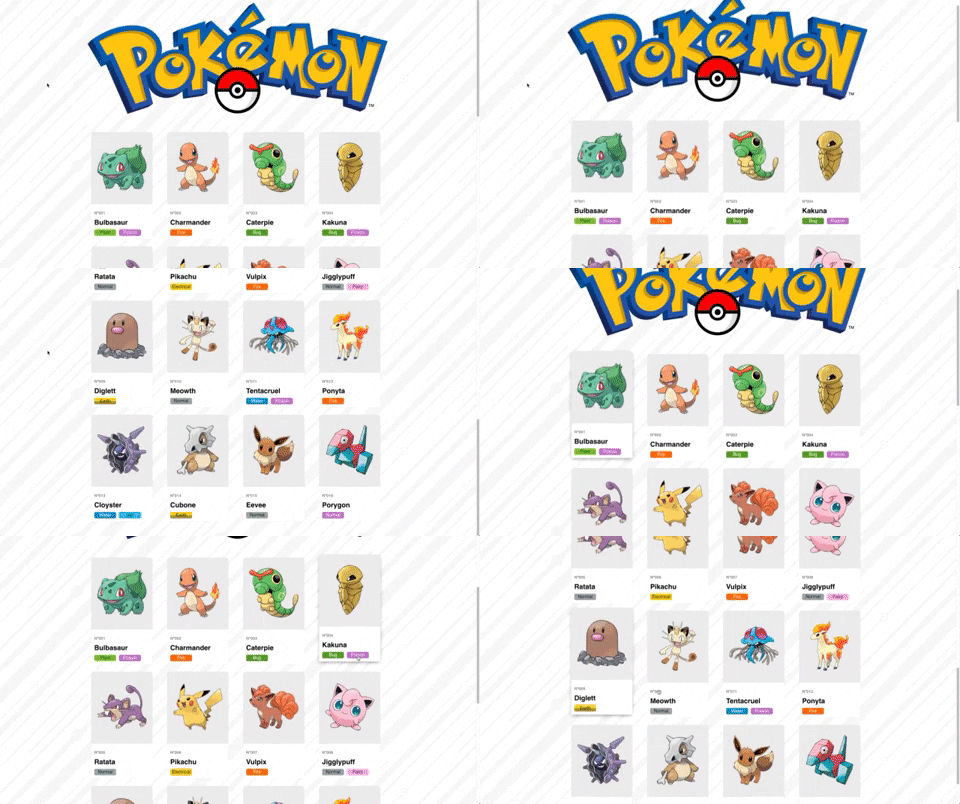
Your task is to help Ash Ketchum from Paleta Town to develop the rest of the application so he can track the count of how many Pokemon has he captured so far. In order to do that, you'll need to:
HTML
- Write the HTML once, thinking about how your content will be distributed for each one of the cards. Don´t worry about the images, follow this link to get all the pokemon thumbnails you might need.
CSS
- Assign the classes you might consider to the HTML elements. To make sure you're all good, take into account that
inside your
style.cssthere should only be classes.classand IDs#id. - Write your css and try to achieve the look and feel of the example. Don´t worry though if you don't get the exact appearance. The important thing here is that your code is readable and uses the necessary CSS properties.
Javascript
- Create an array of objects where you store all your pokemons. Each pokemon should have the following properties:
thumbnail: the path to the pokemon´s image,id: the id of your pokemon (for instance, the position in the array),name: the name of your pokemon (for instance, 'Bulbasaur'),type: An array of strings with each one of the types of each pokemon. (For instance, Bulbasaur is type Plant and Poison)
- For instance, one pokemon could be stored like this:
[ { thumbnail: 'media/bulbasaur.png', id: 1, name: 'Bulbasaur', type: ['Plant', 'Poison'] }]- With that array, you should manipulate the DOM to show on the screen each one of the pokemons, following the structure of the HTML you previously created.
Suggestions
- Before diving into writing your code, think first in the structure of your document. Identify each common part of each one of the cards (the image, the number, the name, etc).
- Once spotted, name your css classes accordingly to the content of each container, it'll be easier to reuse your CSS code.
- Don't despair if you can't do something, every teacher and student are here to help you. If you feel stuck, please ask any of your classmates and teachers, we'll be super glad to solve any doubts!
Bonus points
- Try to make that hover effect when the cursor is pointing each one of the cards. Remember that the
pseudo selector needed for this is
:hover - If you feel creative, try to reproduce the same animation you see on the Gif from above. Even though there are multiple
ways of doing this, a good option is to use the CSS selector
@keyframes.